 YORIMICHI PLAYLIST
HOW TO PLAY
Controls and goals
- How to operate
- Draw lines with a mouse on a PC or touch on a smartphone or tablet. The drawing screen has eraser, skip, and exit buttons.
- Goal
- Draw 6 themes within 20 seconds each and let the neural network recognize the drawings.
ABOUT THE GAME
20 seconds per topic,
Draw 6 times in total.
"Quick, Draw!" is a drawing game published by Google Creative Lab. Each round consists of 6 rounds, with a 20 second time limit for each round. When you draw a line with your mouse or finger, the neural network suggests candidates by voice and text during the drawing process, and when it determines that the answer is correct, it moves on to the next question.
DRAWING AND GUESSING
From where you draw the line,
The guess comes back in words.
While drawing, the theme and remaining time will be displayed at the top of the screen, and neural network candidates will appear in a speech bubble in order. After the 6th test, your pictures will be arranged in a card format, and you can check the recognized and unrecognized pictures on a single result screen.
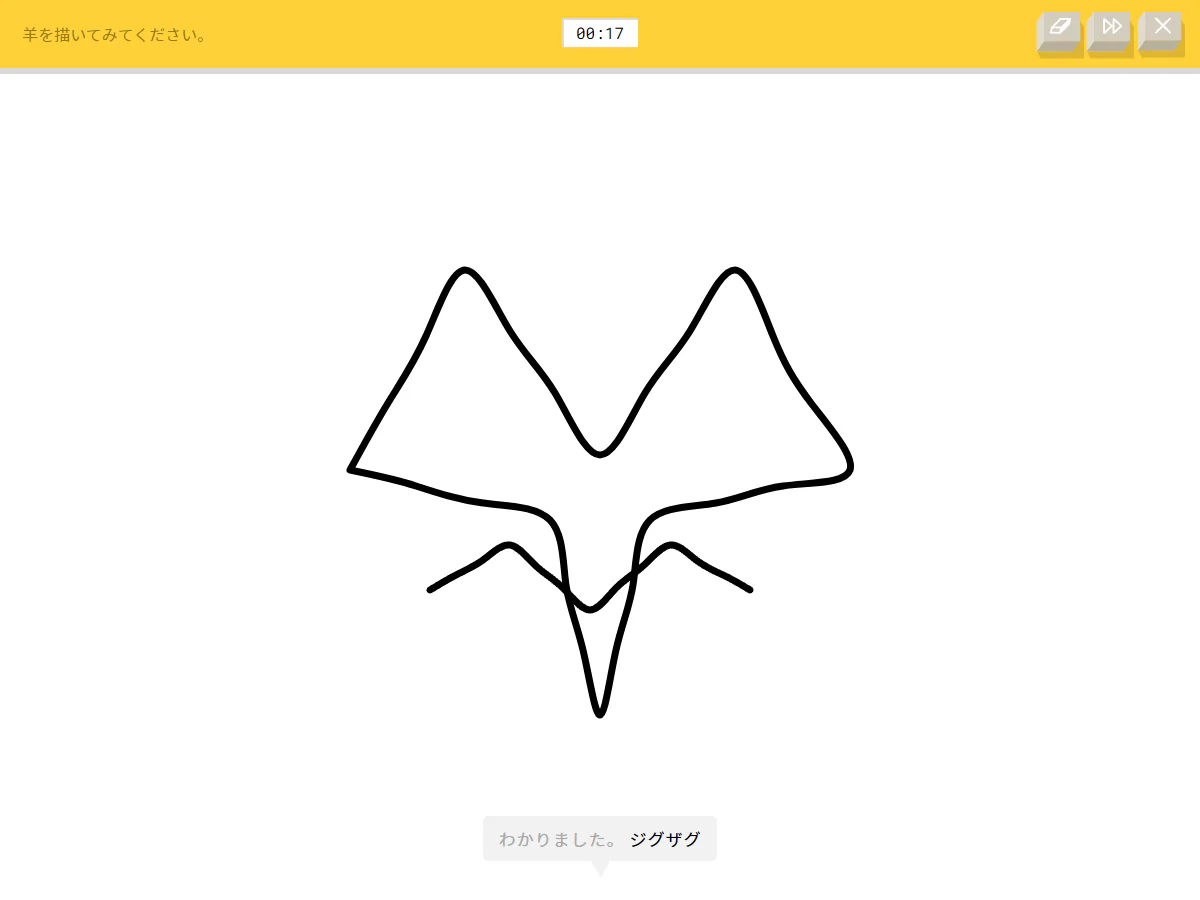
Actual play photography: Detour Playlist Editorial Department / Production: Google Creative Lab / Data Arts Team
Read out candidates while drawing
Every time you add a line, the guess is updated and suggestions are displayed in a speech bubble at the bottom of the screen. The official description is that it is a game that uses machine learning, where a neural network predicts the content of the drawing.
Display the theme and 20 second timer on the same screen
The theme and remaining time are always displayed at the top of the drawing screen. Eraser, skip, and end operations are also grouped together in the same location, allowing you to input and switch each time on a single screen.
Drawing data is released for research
The official dataset organizes 50 million drawings provided by players into 345 categories. Lines are stored as vectors with coordinates and time, and are publicly available for researchers, developers, and artists under CC BY 4.0.
PLAY NOTES
Play notes
- Required time
- There are 6 rounds in one round, and the time limit for each round is 20 seconds. Confirming the topic and viewing the results screen will take additional time.
- Language/Supported environment
- You can choose from 15 languages including Japanese. Works with HTML5-compatible browsers and can be used from PCs, smartphones, and tablets
- Fees/Process
- The official web version is free and does not require an account. Rather than saving long-term progress, playing again after the results screen will start a new round
- Drawing data
- The finished drawing and anonymous metadata such as time, country code, recognition results, and theme are saved. Terms of use for public datasets are CC BY 4.0
Look at the topic,
Start drawing the line.
We confirmed the Japanese official web version, Experiments with Google, Google official blog, and official dataset on July 25, 2026. The two images are in-game screens taken by the editorial department on the official Japanese web version. Sources: Quick, Draw! Official web version (Japanese), Introducing Experiments with Google's Quick, Draw!, Quick, Draw! release date and data introduction on Google official blog, Quick, Draw! Data explanation on Google Cloud official blog, Quick, Draw! Dataset official repository, Quick, Draw! Dataset CC BY 4.0
STREAMING INFO
Streaming and video uploads
We were unable to find work-specific public guidelines for live streaming, video posting, and monetization in the official web version, Experiments with Google work introduction, Google official blog, and official dataset repository. CC BY 4.0 is for public datasets and is not a general license for the entire video, including game screens, audio, and logos. Please check with the rights holder before implementation.
“Unconfirmed” does not mean streaming is prohibited. We have not confirmed an official policy for the general public.
READER COMMENTS
Comments on Quick, Draw!
Share your thoughts after playing, or tell other readers what you recommend about the game.
All language editions share these comments. Comments are shown in their original language.
Loading comments…