 YORIMICHI PLAYLIST
HOW TO PLAY
Controls and goals
- How to operate
- Move with WASD, aim with the mouse, and shoot with the left button. When constructing, select equipment from the menu on the bottom right, rotate it with the wheel, and place it with the left click. Shift is for acceleration, Ctrl and wheel are for zooming in and out.
- Goal
- Organize the supply route for construction materials and ammunition, and protect your base and equipment from enemy waves.
ABOUT THE GAME
Connecting production and transportation to defense
This is a defense game that combines equipment to collect resources, conveyors, and turrets to intercept enemies. Create construction material production, ammunition supply routes, and protect your equipment from waves of enemies. The version we are dealing with here is the Classic version released by the author.
GAMEPLAY
Connect from mining machine to conveyor
In the tutorial, place a conveyor with a certain orientation and add a stone mining machine ahead of it. When you select a piece of equipment, the required materials and durability will be displayed on the right side, and you can check the information about that block by clicking the "?" in the description column.
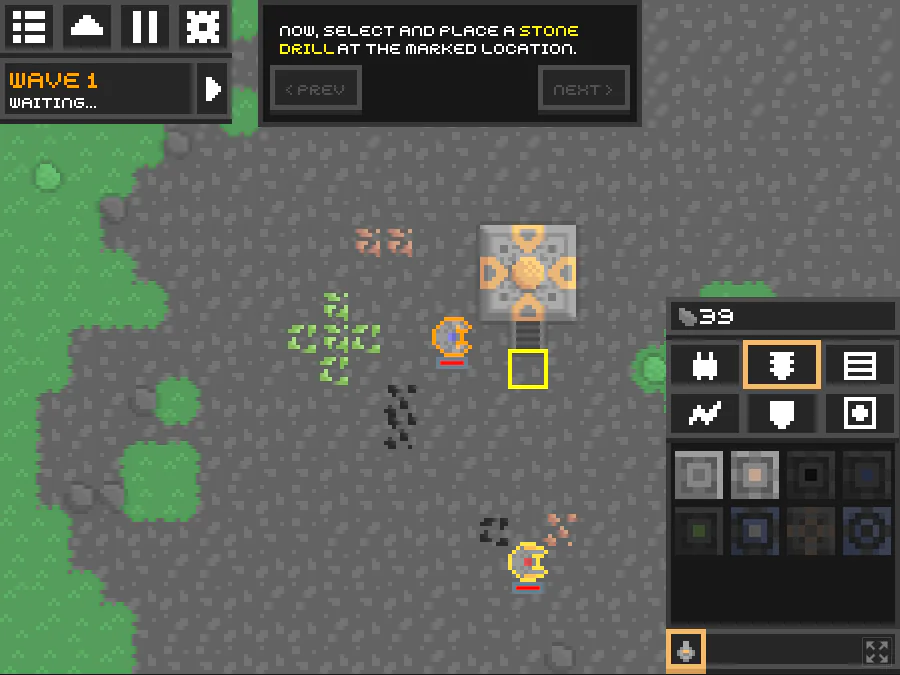
Actual play photography: Detour Playlist Editorial Department/Production: Anuke
Transport the mined resources
Place mining equipment and conveyors to create a flow of resources. The conveyor rotates according to the direction you want it to be transported, and connects materials used in construction and supplies to production equipment.
Create a supply route for the artillery battery
Build a supply network to transport ammunition to the turrets and prepare for enemy waves. The main focus of the game is defense to protect equipment and transportation of resources to operate the equipment.
Switch between movement and construction
You can move with WASD, aim with the mouse, and shoot with the left button. Select a block in the construction menu, rotate it with the wheel, and place it. The tutorial will guide you through the operation and location.
PLAY NOTES
Play notes
- How to get started
- Select Tutorial from Play and proceed with the guide. Conveyor is a conveyor, Stone drill is a stone mining machine. The yellow frame is the designated placement location, align the orientation and then install.
- Language
- There is no Japanese in the official translation list for Classic. Reading in a supported language such as English is required to read the construction location, rotation method, and role of equipment. Question mark opens the explanation with a "?", and Health refers to the durability value.
- Edition and price
- The Classic version of the browser game published by the author can be played for free. This is an older version that is distributed separately from the current Minddustry, and the download version is available at an optional price. The content and images in this article are for Classic.
- Estimated time
- Officially, there is no fixed time required for one session or the entire session. This configuration allows you to prepare for enemy waves while producing resources and expanding your base.
Combining mining and transportation,
Get ready for the next wave.
The official work page and official web version were confirmed on September 23, 2026. The two published images were taken by the editorial department on the official web version. Sources: Official author page/Classic version overview and distribution, Author's Classic official repository/positioning of old editions, Classic official translation file list
STREAMING INFO
Streaming and video uploads
The official work page I checked does not have explicit permission conditions for video posting, live streaming, or monetization. Please check the author's latest information before distribution.
“Unconfirmed” does not mean streaming is prohibited. We have not confirmed an official policy for the general public.

READER COMMENTS
Comments on Mindustry Classic
Share your thoughts after playing, or tell other readers what you recommend about the game.
All language editions share these comments. Comments are shown in their original language.
Loading comments…