 YORIMICHI PLAYLIST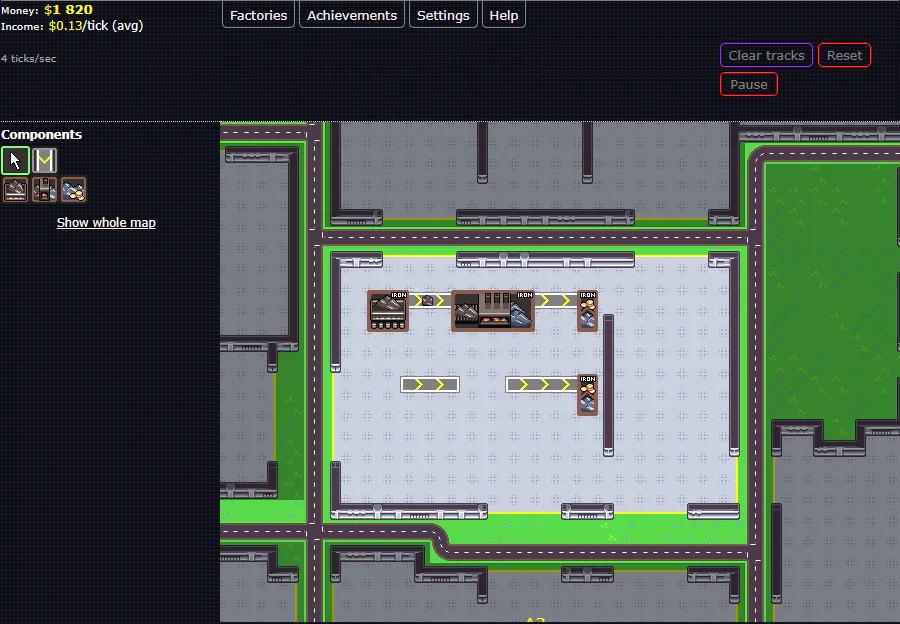
HOW TO PLAY
Controls and goals
- How to operate
- Select the equipment icon on the left and click inside the factory to place it. Connect by selecting a conveyor and dragging it from inside the equipment to the destination. Right-click while selecting equipment to sell the equipment in the target range, and use Space to switch between the cursor and the previous part.
- Goal
- Build a production line that connects the purchase, processing, and sales of raw materials, and use the income to expand your factory and product types.
ABOUT THE GAME
Place equipment and connect flow
This is a factory management game where conveyors connect equipment for purchasing raw materials, equipment for processing, and equipment for selling products. Automate production and transportation, check equipment capacity and required quantities, and increase income and factory size.
GAMEPLAY
Pass transportation route between equipment
Place equipment and conveyors on the factory floor. The upper row of the image is a line connecting the purchase, processing, and sales of iron, and the lower row is a section in the process of being rearranged. The arrow on the conveyor indicates the direction in which the resources are being transported.
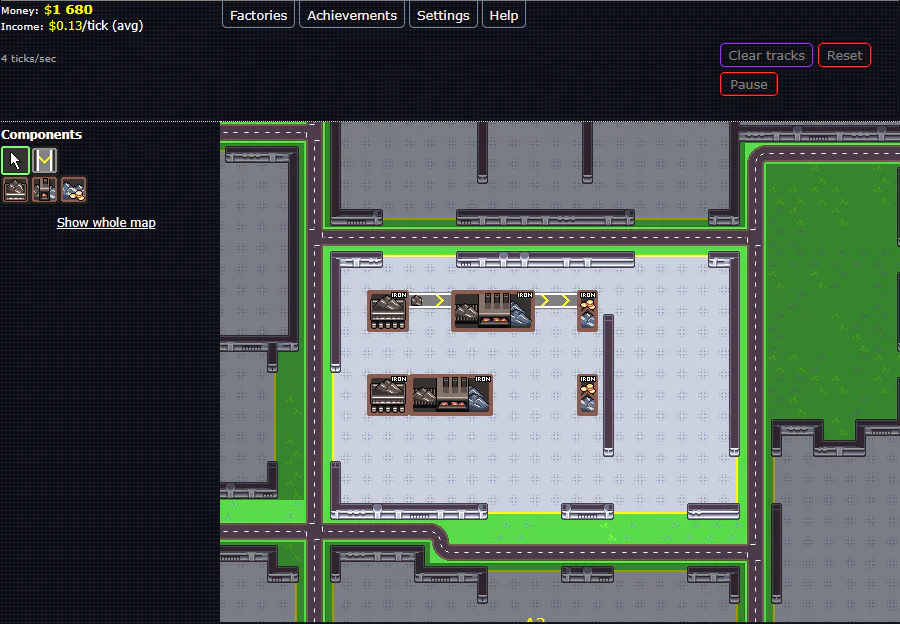
Actual play photography: Detour Playlist Editorial Department/Production: Baldurans
Assemble placement and transportation separately
Select equipment from Components on the left and click inside the factory to place it. Connect the conveyor by dragging it from inside the departure equipment to the destination equipment. In addition to arranging equipment adjacent to each other, we also design how resources will be transported.
Combine equipment according to production volume
The initial Iron ore buyer buys 1 iron ore every 10 ticks, and the iron foundry makes 1 iron from 2 iron ore every 10 ticks. The ratio of required equipment changes depending on research and enhancement, and can be checked in the table for each equipment.
Use your income to expand your production network
While selling products and earning funds, you can upgrade your equipment, create new products, and expand your factory. Existing equipment can be sold and conveyors can be rerouted, and the layout can be rearranged when production volume changes.
PLAY NOTES
Play notes
- How to get started
- Close the starting guide and open the first factory using the in-game money from BUY in Factory. Help includes basic operations and configuration examples in Getting started and Setting up iron production.
- English explanation
- English is required to read equipment usage and production conditions. Iron ore buyer is equipment for purchasing iron ore, Iron foundry is a steel mill, seller is sales equipment, and Income is income. A tick is a unit of processing in which production progresses.
- Price and time
- You can start the official browser version for free. There is no official end time indicated, and it is a continuous structure where you accumulate income and research to expand the factory.
- While the game is closed
- In-game Help explains that bonus ticks accumulate while closed, allowing you to progress through the game faster after reopening.
Check the production amount,
Connect the next line.
The official work page and official web version were confirmed on September 23, 2026. The two published images were taken by the editorial department on the official web version. Sources: Official web version/In-game Help and equipment explanation, Author distribution page, work description and update information
STREAMING INFO
Streaming and video uploads
The official work page I checked does not have explicit permission conditions for video posting, live streaming, or monetization. Please check the author's latest information before distribution.
“Unconfirmed” does not mean streaming is prohibited. We have not confirmed an official policy for the general public.
READER COMMENTS
Comments on Factory Idle
Share your thoughts after playing, or tell other readers what you recommend about the game.
All language editions share these comments. Comments are shown in their original language.
Loading comments…