 YORIMICHI PLAYLIST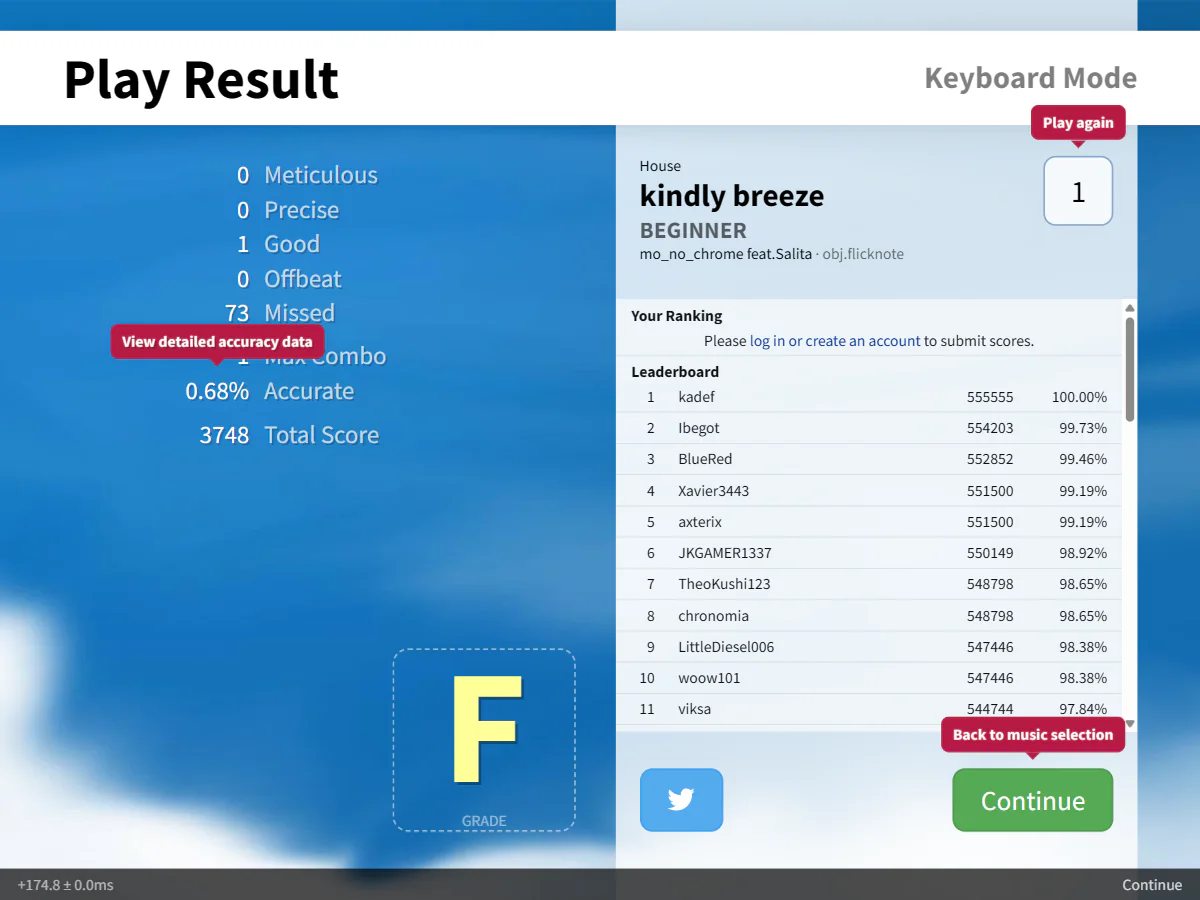
HOW TO PLAY
Controls and goals
- How to operate
- Press the keyboard key corresponding to each lane. Key assignments can be changed in settings
- Goal
- Input when the note reaches the judgment line to improve accuracy, score, combo, and grade
ABOUT THE GAME
Select the song and score,
Place your finger on the judgment line.
``Bemuse'' is a rhythm game that can be played on your browser. Once you have selected the mode and decided on the song and score, start playing and press the corresponding key at the timing when the notes on each lane reach the judgment line.
RESULT BREAKDOWN
After finishing one song,
Looking back at judgment and accuracy.
The result screen displays the number of times, maximum combo, accuracy, score, and grade for each judgment. You can check the input results for each song using multiple indicators.
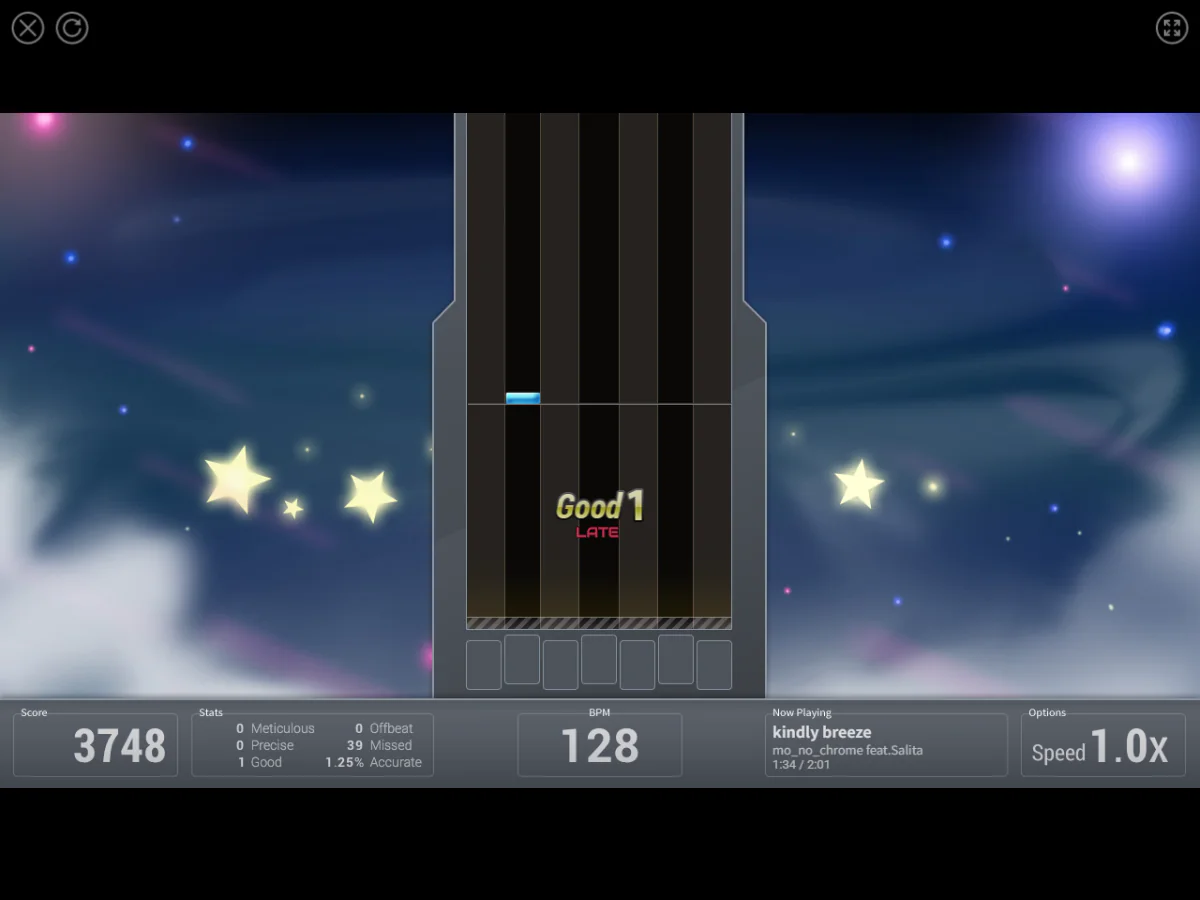
Actual play photography: Detour Playlist Editorial Department / Production: Thai Pangsakulyanont (dtinth) / Bemuse contributors
Input the keyboard according to the notes
Press the corresponding key on the keyboard at the timing when the notes of each lane reach the judgment line. The accuracy of the input will be reflected in the judgment and score.
Choose a mode, song, and difficulty level to get started
Keyboard Mode is based on 7 keys, and the tutorial uses 5 keys. BMS Mode handles 7 keys and scratches, and the score difficulty ranges from Beginner to Insane.
Check results with multiple indicators
When you finish a song, the judgment breakdown, maximum combo, accuracy, score, and grade will be displayed.
PLAY NOTES
Play notes
- Required time
- Different for each song. The kindly breeze I chose when posting was displayed as 2:01 on the song selection screen.
- Mode/Difficulty
- There are Keyboard Mode and BMS Mode, and the difficulty level of the score is displayed from Beginner to Insane.
- Language
- There is no list of supported languages in the official documentation. The official website and in-game UI I checked were displayed in English.
- Fees/Support environment
- You can play for free in your browser. The official User Guide indicates the latest Chrome, Firefox, iOS Safari, and Android Chrome (Oreo or later) as supported environments.
- Account
- You must log in to save scores and statistics and use the ranking function. The storage specifications when logging out could not be confirmed in official documents.
Select the song and score,
Create a rhythm with the keyboard.
We checked the Bemuse official website, official project page, official User Guide, and official GitHub on August 5, 2026. The required time of 2:01 for Kindly Breeze is the display confirmed on the song selection screen of the official web version. The two published images were taken by the editorial department on the official web version. Sources: Bemuse official website, Bemuse official project page, Bemuse Official User Guide, Bemuse official GitHub repository
STREAMING INFO
Streaming and video uploads
We checked Bemuse's official website, official project page, official User Guide, and official GitHub, but we could not confirm any policy that allows general live streaming, video posting, and monetization all at once. The AGPL-3.0 license of the main code posted on the official GitHub does not indicate permission to use the recorded songs or BGA. This does not mean that distribution is prohibited, so please check the rights for each song and BGA you use.
“Unconfirmed” does not mean streaming is prohibited. We have not confirmed an official policy for the general public.

READER COMMENTS
Comments on Bemuse
Share your thoughts after playing, or tell other readers what you recommend about the game.
All language editions share these comments. Comments are shown in their original language.
Loading comments…