 YORIMICHI PLAYLIST
GAME FEATURE · 477
Pixtorio Place machines on the grass,
then give the workers a job.
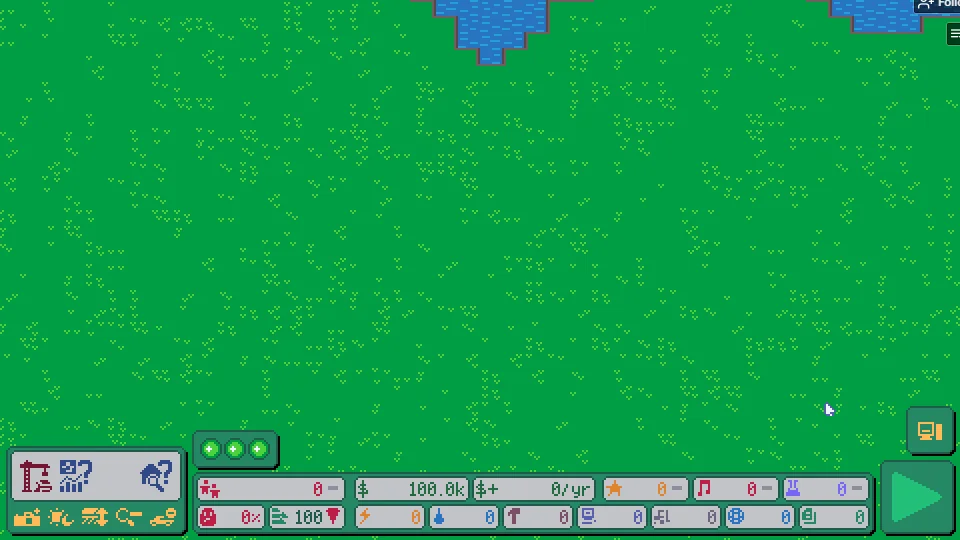
Pixtorio builds resource flows from small workers and machines. I placed Bucket Presses and a conveyor near the berry base, selected red workers with a box and ordered them to a machine. Its display reached 3/3 workers; a later screen showed two axes, three yellow workers and 25 wood.
Gameplay capture: Yorimichi Playlist editorial team / Game: fued
HOW TO PLAY
Controls and goals
- Controls
- Left-click a construction card, then left-click the ground to place it. Drag a box with the left button to select workers and right-click to order them. For machine assignment, aim at the ground-level tile under the base.
- Goal
- Gather resources with workers and combine machines with transport routes to expand production. The opening guide includes building a Bucket Press and assigning three red workers.
ABOUT THE GAME
From a berry base to machines on the grass
The opening has a berry base and red workers moving across the grass. Selecting Bucket Press below showed its cost and placement guidance; clicking the ground built the machine. A translucent preview lets you inspect the proposed location first.
GAMEPLAY
Staff the machine and watch the counters change
The first image is before construction, with five red workers and 20 wood. The second contains two Bucket Presses and a conveyor, with the left machine's information showing 3/3 workers. The top counters read three yellow workers, two axes and 25 wood.
Gameplay capture: Yorimichi Playlist editorial team / Game: fued
Check the cost, then build on the ground
A construction card places a machine preview at the cursor. The second Bucket Press listed ten berries and five wood; placing it reduced wood from 20 to 15. Building the conveyor used another five wood.
Box the workers and order them into a machine
I dragged a selection box around red workers, then right-clicked the ground-level tile beneath the Bucket Press. Aim for the tile under its base, rather than the upper part of the drawing. The machine's lower information panel subsequently read 3/3 workers.
Compare staffing with new worker types
Machine information lists workers, berries to process and axes ready. After assigning red workers, the yellow-worker counter changed from zero to three, and the axe and wood counters increased too. Check staffing alongside the resources rather than only placing a facility.
PLAY NOTES
Play notes
- Language
- Facility names, staffing, costs and instructions are English. Colored counts and resource icons help track the results.
- Price and setup
- I played the free official itch.io Web version in a PC browser with a mouse.
Give the swarm its next workplace.
Place a machine on the grass.
The official creator page, controls and Web version were checked on 2026-10-23. Both images were captured by the editorial team in the official Web version. Sources: Official creator page and controls
STREAMING INFO
Streaming and video uploads
Explicit streaming and monetization terms were not confirmed on the official page. Check the creator’s current guidance before streaming.
“Unconfirmed” does not mean streaming is prohibited. We have not confirmed an official policy for the general public.
READER COMMENTS
Comments on Pixtorio
Share a warm note, a favorite moment, or a gentle tip for the next player.
All language editions share these comments. Comments are shown in their original language.
Loading comments…